Category: Computers

  • Why I Choose Claude Over ChatGPT and Gemini

    After exploring ChatGPT, Gemini and Claude in the LLM space, I have decided to stick to one, Claude. As of me writing this all the 3 LLM’s have released newer and better versions. To me Claude does things natively which you have to prompt ChatGPT/Gemini. For me, Claude seems to understand my intent better and provide visual results intuitively.

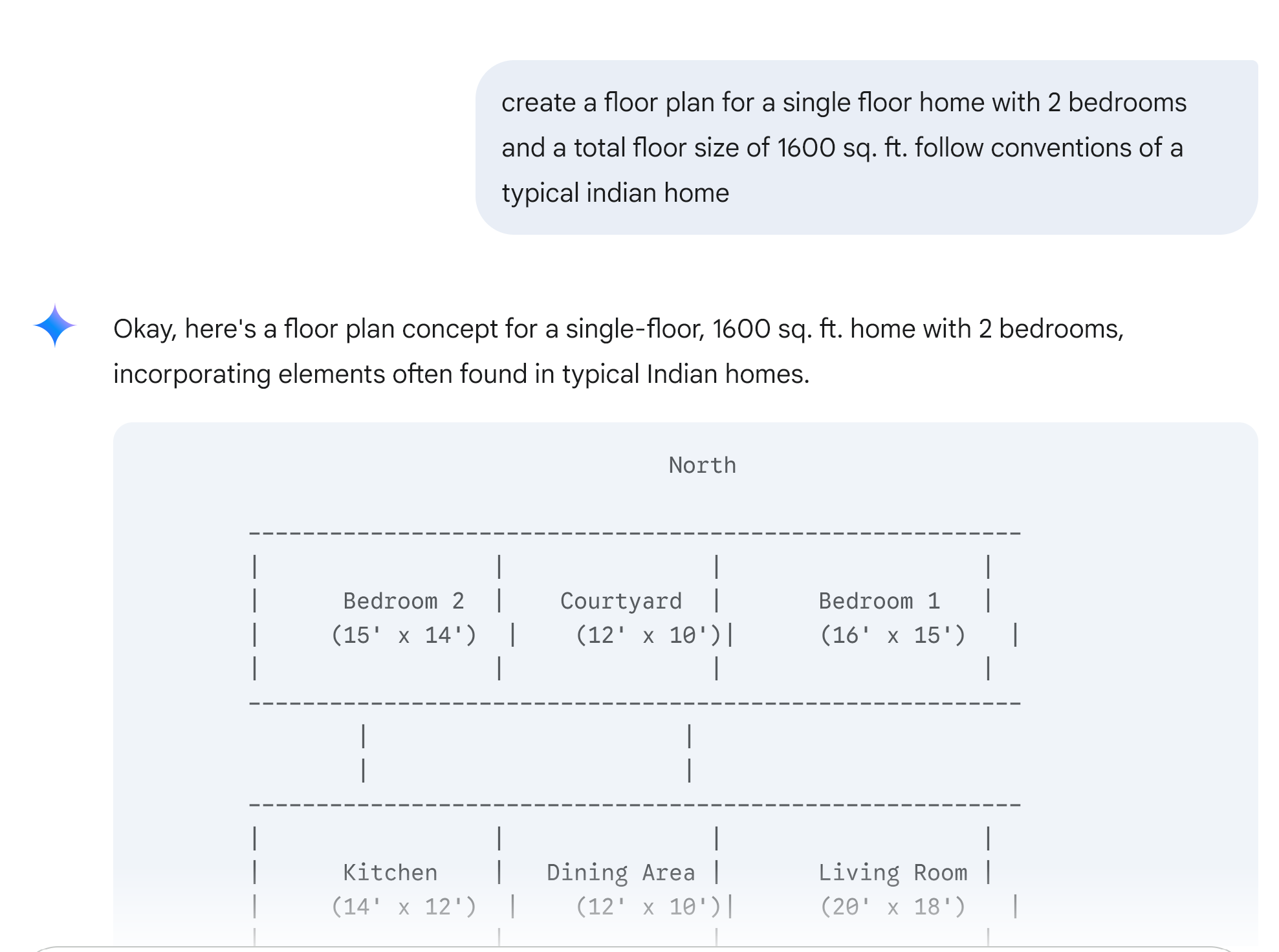
    Here is an example. Recently I had a personal request to come up with a draft home plan for a house. Here is my prompt and the response from Claude. If you notice, Claude created a image as well as explained all the key features. You can easily see it was not correct the first time, but I was able to get it tweaked by asking Claude to fix it errors.

    For the same prompt with Gemini, here is what I received as response
  • Mobile Capability

    I have a Google Pixel 3 phone. Today at home, I was listening to songs using the JioSaavn app. This was streaming the songs via Google Home speaker in my living room. At that moment, my dad called me on WhatsApp voice call.

    At that moment, I thought that the songs will stop when the call comes through. My son attended the phone call and I was watching him. He switched the WhatsApp call to a video call. But the songs continued to play on the Home speaker. My initial thinking was this current song was already streamed and so it was able to play and I waited for the next song to begin. To my amazement, the songs continued with no interruption and the video call was fine as well.

    I was stuck in the olden days when you attend a phone call, it caused an interruption and the phone will react to the phone call causing all audio-related actions to pause.

  • Raspberry Pi

    A couple of months back, I bought a Raspberry Pi. It has been lying around for a while with no real use, except for some show off. My wife created a nice case for it. Last week, I almost lost an important file and that’s when I realized I needed a backup solution in my home. Thought of using the Raspberry Pi for this and was browsing to find some insight into how to do it. There is a nice article on how to setup NAS using Raspberry Pi in HowToGeek website.

    After this, I also wanted a Linux box to try and learn a new language (C). Instead of installing a VM on my Windows machine, and since Pi was created for education, decided to put Pi to Learning C use. Since my setup of Pi as NAS was supposed to be low-power, always-on, it had no monitor, keyboard connected to it, I wanted to remotely access the Pi from my windows machine. So I ended up setting SSH on Raspberry Pi.

    Good use for a $35 dollar computer

  • Rooted Samsung Galaxy S II

    Just now rooted my AT&T Samsung Galaxy S II phone using heimdall on my Mac. Instructions: http://forum.xda-developers.com/showthread.php?p=18576627#post18576627 (11:30 PM)

    Was not able to copy the file (zImage) of Siyah into the phone’s card using Mac Terminal. Wasted a lot of time on this. Decided to go ahead and copy the file to the phone’s /download folder for following instructions 3d in the above link.

    Installing ClockWorkRecoveryMod is completed (12:23 AM)

    Tried Ultimatum and SHOStock2. Ultimatum crashes the android.com.phone service. Reverted to backup (05/03/2012 : 12:20 AM)

  • iPad 2

    Bought an iPad 2 this week. I am exploring the different apps to install on it.

    Got iBooks, Kindle, Netflix, Weather, Dropbox, Angry Birds installed. My hunt for a gTalk app with video chat capability had led to vtok. Google’s version of gTalk for iPad does not provide voice or video chat capabilities.

    iBooks and Kindle both look great. iPad2 supports Unicode fonts. With access to books in HTML format, I was able to convert the HTML files to EPUB files using Calibre software. Calibre also makes it easier to move ebooks to iPad. I am now able to read books in tamil on my iPad.

    My wife is busy reading and playing Angry Birds game on it.

    Will keep updating this post on my experience with iPad 2.

  • Screen Capture Tool

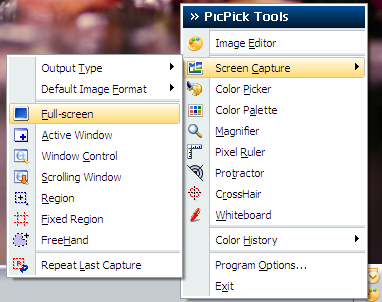
    PicPick is a wonderful free alternative to SnagIT. When hunting for free Screen Capture tools, got really impressed with this small and free tool.

    PicPick provides the following ways to capture screen:

    • Full Screen
    • Active Window
    • Auto Scroll
    • Region

    It also includes a Image Editor that allows for annotation, basic image editing, exporting and sharing.

    picpick
    Screen Capture – PicPick

    It also provides, zoom, whiteboard and crosshair to be used on the desktop. Worth the try!

  • Playstation 3

    After a lot of debates on which gaming station to choose between XBOX, PS3 and Wii, I finally bought a PS3 recently.

    NFS Pro Street, Madden, Uncharted, Prince of Persia, Call of Duty… Purchased these to play around for another one month. Also, I have switched to watching movies on Netflix and DVD’s on my TV since the arrival of PS3.

    Officially, PS3 is now my entertainment center!

  • Google Image Search

    Google is making a lot of improvement on the UI front recently.

    Today, they have improved Image Search with displaying all the search results on a single page. The page displays only the images. On scrolling over the image, details about the page that the image comes from is displayed.

    Improved Image Search on Google

    A welcome improvement!

  • Logi XML BI Tool

    For the current project that I am working on, we were looking for alternatives to the SQL Server Reporting Services. We ended up with a really good BI solution, LogiXML.

    LogiXML is a XML based reporting solution available for .net and Java platforms. More information can be found in their website, www.logixml.com

    To us, it really simplified the way we used to work on reports. It was something similar to the Sagitec Studio, that we use in our work everyday (Sagitec Studio is for Web Development, developed and used as a product by my current employers), which meant lesser learning curve. The AdHoc Reporting capabilities is what caught our attention. It is neat, the LogiXML team has thought through most of the aspects of Reporting.

    All common reporting functions, with an excellent support team. They have always responded quicker. The product is well documented and supported. If I like one reporting tool, it must be LogiXML. Will definitely recommend it to anyone.

  • Uninstalling MySQL on Mac OS X

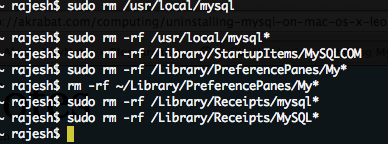
    Here are the steps to perform a clean un-install of MySQL from your Mac.

    Execute the following commands at the Terminal

    Uninstalling MySQL

    Open /etc/hostconfig file in a text editor and remove the following line

    MYSQLCOM=-YES-

    That’s all.