I had challenges in understanding the documentation for installing and configuring CruiseControl.Net with StarTeam as the souce control in a Vista system running IIS 7. Finally I have successfully set up cruise control to work. I am listing the steps to get it working.
Step 1:Grab a copy of CruiseControl.Net from here. Run the setup. As a part of the install, the setup installs the ccnet server and a webdashboard.
Step 2:Once installed, to get the webdashboard up and running, fire your browser and type. http://localhost/ccnet (this is the default virtual directory on install. This points to the $InstallFolder/webdashboard folder in your build server. If the system is running IIS5 or 6, then you will see a CruiseControl.Net page, in IIS7, an 500 error is thrown. To resolve this issue, proceed to Step 3, if no issue was encountered, proceed to Step 4.
Step 3:Run the followin command as an administrator. Note: Here ccnet is the virtual directory which points to the physical location of webdashboard in the system.
%SystemRoot%\system32\inetsrv\appcmd migrate config "Default Web Site/ccnet"
Once the command is run, then just restart iis and browse to http://localhost/ccnet. It should show the CruiseControl.Net dashboard.
Step 4:Next step is to configure the ccnet server. Open the ccnet.config file located in the ‘server’ folder of the install directory to edit.
Project Section:
Define the project section. The project name can be any identifier not necessarily your project name. This will be used by CruiseControl.Net to recognize your project.
Source Control Section
In my case, the source control was StarTeam. Various properties like login credentials, project etc, are to be set.
Executable:Path to the ‘stcmd.exe’ the Star Team command line utility.
Project:The name of the Project as defined in Star Team, that has to be extracted.
UserName, Password, Host, Port:Star Team Server connection setttings.
Path:Path from which files have to extracted from StarTeam. Example: Consider the Project root folder in StarTeam is “Test”. Let the project and solution files lie in the hierarchy “Test\TestProject\MyProject”. To pull the project files and solution from this location, specify “Test” for project and “TestProject\MyProject” for path.
Override Folder Working Directory:Path to which the files from Star Team are to be checked out for the build. If not specified, the original working folder specified in the StarTeam will be used to extract the files.
Auto Get Source:Specifying this to ‘true’ will allow CruiseControl.Net to automatically check out files from StarTeam
fileHistoryRegEx:I had to make a change to the Date regular expression, as my regional settings was configured to English(India), wherein DateTime is specified as DD-MM-YYYY HH:MI:SS (IST). I had to change this, since I got a Format invalid:System.DateTime exception during the run.
TimeOut:Specify the timeout for StarTeam polling.
Following is the complete listing of the starteam configuration block.
StarTeam
MSBuild section
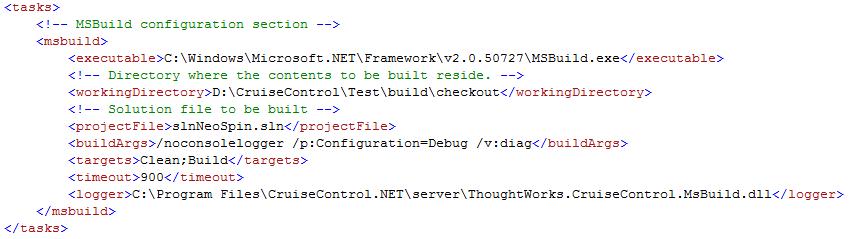
I used MsBuild for the build task. Following section explains the properties involved to get the MsBuild setup for CruiseControl.Net.
Executable:Path to the ‘MsBuild.exe’ file in the system.
Working Directory:Location of the files to be built. i.e., Location to where the StarTeam extracted the files that need to be built.
Project File:The .proj file or the .sln file that needs to be built.
Build Args:Specifies additional arguments passed to the msbuild.exe.
Targets:Actions to be done. Here I wanted Clean’ and then ‘Build’ done on the Solution.
Timeout:Time after which error message will be displayed if there happens to be a failure to invoke the build.
Logger:Location of the logger assembly that will be used to produce the build result.
Following is the complete listing of the msbuild configuration block.
MS Build
Triggers Section
Triggers section specifies the time and condition when the build of the project had to be invoked. During intital setup for testing, set the buildCondition to “ForceBuild” (forces a build), and once the testing is done, change it to “IfModificationExists”(does a build only when a modification is detected).
Following is the complete listing of the Triggers configuration block.
Triggers
Step 5:Run the ccnet.exe application located in the ‘server’ folder of the CruiseControl.Net install location. The code will be pulled from the StarTeam to the location specified and the build should proceed. The results of the build are stored in the $InstallFolder\ProjectName\Artifacts\ms-build.xml file.
Starting out on the Open Source fever, I installed Mandriva, Suse and finally have settled with Ubuntu after two days of fighting over which distribution to go with. But Ubuntu doesn’t ask a lot of questions during install, about what to install and where to install grub etc.
After installing Ubuntu, I saw that it had not even install gcc libraries but had installed the gcc compiler. Also, the default operating system to boot into was ‘Ubuntu’ instead of Windows XP. As I and my friends use the same machine and they have no liking to Linux, I needed Windows to boot first. During the installation, I was not provided the option to choose.
I wanted to change the default boot option in grub. I had to edit the ‘menu.lst’ file located in /boot/grub manually. It does not allow to edit as the permissions for the only user was denied. The concept of ‘root’ user was not there, as I was not requested for the creation of a root user. I just created a user, and ubuntu assigns super user privilege to this user.
To switch users, the ‘sudo’ command was to be used instead of ‘su’.
Finally, all set and working. Still to install ruby, mysql, python, vlc.
I was stumbling the web as usual a few days back. I came across a keynote speech by Chris. This has changed my entire perspective of viewing the software business and industry. I have till now just enjoyed life as a programmer, reusing existing code, ‘googling’ what I don’t know and getting the job done by time.
My life as a software engineer has just been concentrated on providing solutions that already exist. But real software engineering is not that. My goal in life is not that. I need to engineer something. A product, that people use in their day to day life. I remember my Engineering Mechanics professor’s definition of an engineer, ‘A person who creates, engineers something so that it is useful to the society in their daily life’. That is what I feel as the soul calling.
This keynote address, http://gist.github.com/6443 was what I have been wanting to inspire me. He tells what a software is all about. It is the passion of a programmer that creates the wonder, a Real Software. What a programmer needs to do? The real joy comes from within and not from materialistic gains.
What in the world can be more inspiring than one’s own creation. I have had moments when I felt this joy, pride and enthusiasm, that comes when I did programming, when a thing that I have been struggling with, at last comes to place, when the very blank mind of mine, finds a solution to a problem, when a client or peer appreciates. But they did not last long.
Open Source is calling me to contribute. I have started out with Ruby and Python. Any suggestions are always welcome.
Google had launched its new browser ‘Google Chrome’. Right now I am typing this post in the Chrome browser. True to how Google had been in the past, ‘Google Chrome’ is simple, clean and does what it was intended to do.
For developers, there is a Javascript debugger. Although I am missing the addons that I had in Firefox, I am sure that we will be having a lot of addons in the coming months.
The interface is simple, loads a lot faster. There is one more feature, that is new in ‘Google Chrome’, the ‘incognito’ mode, wherein no browsing history, cookies are saved. Google had incorporated the best of features in all the browsers in this launch. Tabbed browsing, unintrusive password remembering tools, smooth import of bookmarks from IE and Firefox.
I have downloaded the linux source code for version 0.0.1 from http://lxr.linux.no/.
I just wanted to get started on reading and trying to find out what each one of the files are doing. Where do I start off. I am not quiet comfortable in semaphores or operating system stuff like that.
My first PC was a P II @266MHz system, with 8 GB HDD and a whooping 32 MB SDRAM. It was by and large a nice configuration then I could easily accommodate Windows 98 in 1 GB and the remaining space was for me to load songs, NFS, games and all goodies.
I used to read a lot of computer magazines, Digit topping the list. In my 11 th standard, along with Developer IQ magazine they shippped a CD containing Mandrake Linux 8.1 (in association with Deep Root Linux in India). Rather adventurous, I wanted to try this new operating system. I had not seen any other OS than the dominant Win 98 and Win 95 in my school PCs. So trying out a new OS was something thrilling.
If I remember correct, it was my summer holidays. So I had all the day to myself. I put the Mandrake CD into the CD-ROM and waited for it to start installation. I was not familiar with the installation procedures, and I was too lazy to read through the installation instructions in the book. I chose the automatic partitioning, defaulted to all the setup options and in the screen wherein Linux configures hardware, I was stuck up with the monitor not getting detected. I started my first line of defence, the ubiquitous (Ctrl + Alt + Del) combination. It dropped me to the command line and told me that system was going for a restart.
Then on restart, it brought the LILO boot screen and halted. I booted into DOS prompt using a boot CD and
tried to see what had happened to my windows data using FDISK. DOS recognized the partition as NON-DOS partition. I cursed myself for ruining a nicely running machine. So I took the second line of defense, reinstalling Linux (this I tried so that I could recover my windows partitions, since the partition manager in the installer of linux was graphical, it was easier.) I installed Linux again. This time I read through each and every screen, that is when I noticed that we had option to dual boot into Windows, choose the boot loader etc. The install was fine till the monitor setup. I chose the Generic Monitor setup this time and it seemed to work. The system was re-booted, and at last I saw dawn. I had booted into a new OS. Mandrake Linux.
KDE was the desktop environment provided. I came to know about the different options available only much later. I was new and everything needed me to go into Root mode and install or update (RPM was available then. I tried installing Java into the system, that is when I found out, it was easier to use shell in Linux than use the graphical tool. I missed my Windows very much. So I popped in my Win 98 CD and started installing it. After install only did I realize that the boot loader was re-written by Windows and I had lost the option of booting into Linux. I didn’t feel for the loss of Linux, as I had my safer, usable and friendly Windows on hand.
PS: Now I can use Linux more effectively. I learnt it the harder way.


 Raasukutty's