Tag: C#

  • Jupyter Notebook for C# – Install Guide

    If you are trying to install and try Jupyter Notebook for .Net (C#), you will see a lot of install instructions for the .Net Core 3.1.2 with dotnet-try command. .Net Core 3.1.2 is out of support. I had the same issue here and in this post, I am trying to document how to get Jupyter Notebook on my Windows machine to work with .Net code support.

    Install .Net Core Runtime

      Get the latest version of .Net Core installed from https://dotnet.microsoft.com/en-us/download. The version as of this writing is .Net 8.0

      Install dotnet-interactive

      Next, open up a terminal window and run the command below to install dotnet-interactive. You will receive a successfully installed message.

      dotnet tool install --global Microsoft.dotnet-interactive

      Install Jupyter

      In the terminal window issue the following command

      dotnet-interactive jupyter install
      

      Download and Install Anaconda

      This is required to run the Jupyter kernel. https://www.anaconda.com/download#

      Open Anaconda Prompt from the Start Menu. You can try the .Net CSharp for Jupyter by issuing the following command in the Anaconda prompt

      jupyter kernelspec list

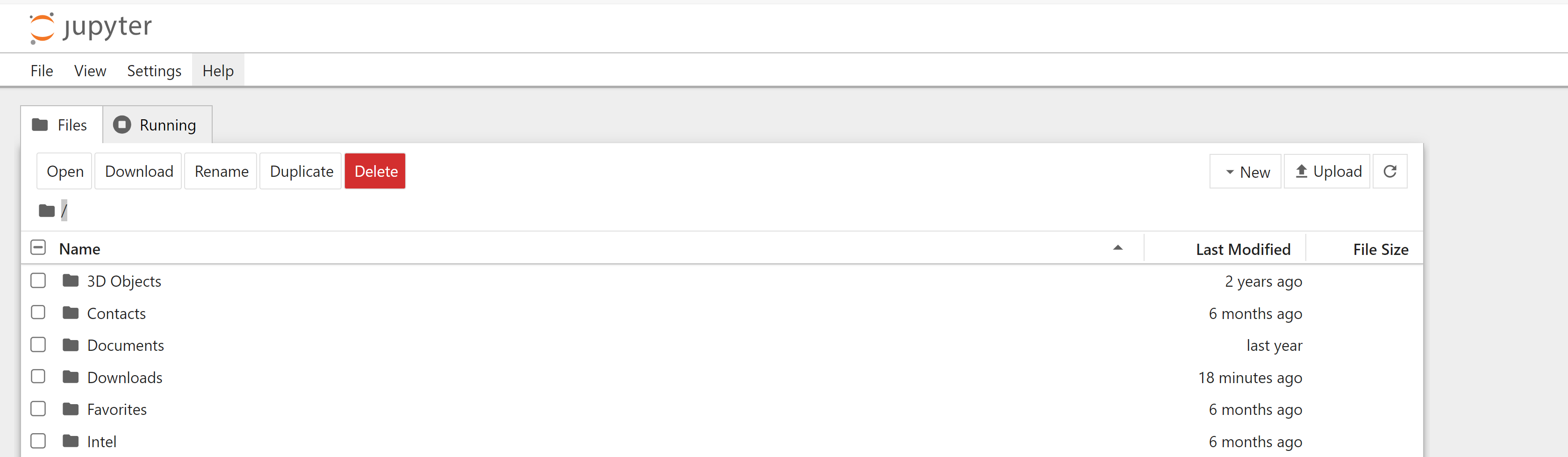
      Now execute the following command to start a new notebook. This will start a browser instance with a new jupyter notebook web version interface.

      jupyter notebook

      Click on the ‘New’ button on the right top corner to create a new notebook.

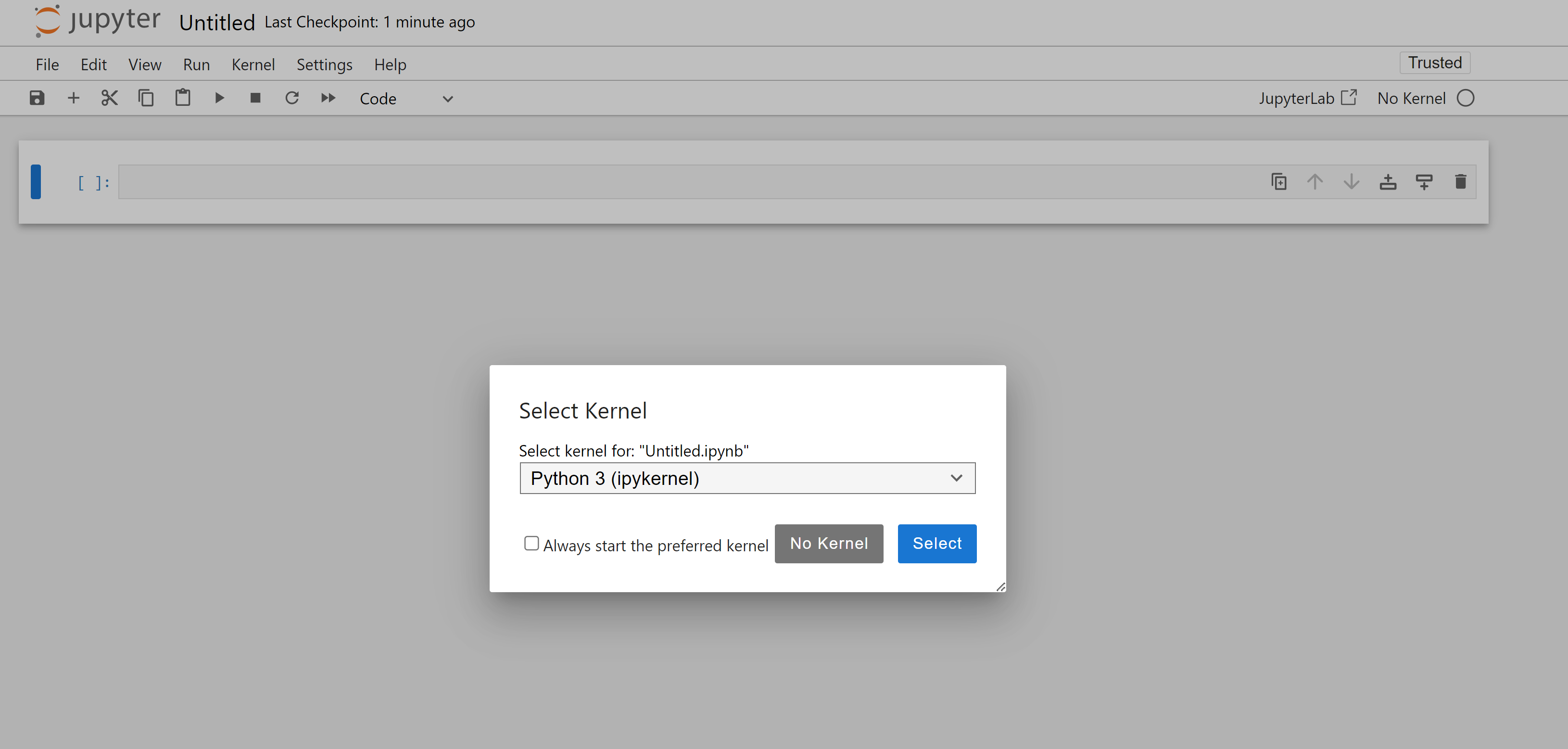
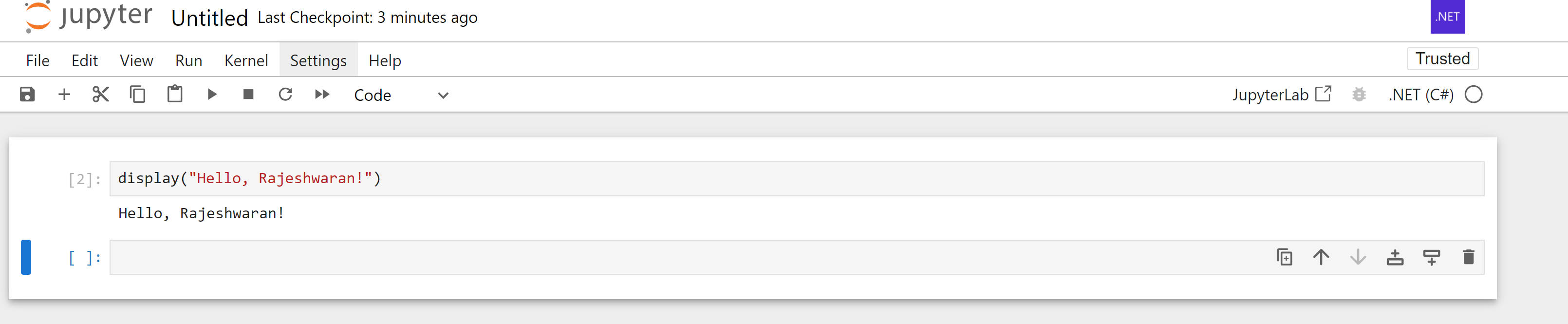
      In the new notebook, you can pick the .Net (C#) kernel

      You have a Jupyter Notebook that supports C#

    1. C#: LINQ Join and order by

      Recently, I had a requirement which read as this:

      Allocate payments into the details by contribution type such that oldest due amounts are first allocated based on the allocation order specified.

      To re-phrase it in programming terms, we had a collection that contained due amounts with contribution type and date due. We also had a rule set that defined which contribution type has to be allocated first. Overriding this rule set was the oldest due amount rule.

      So the collection with the due amount and date is defined as below:

      public class Detail
      {
      	public string contribType { get; set; }
      	public decimal amount { get; set; }
      	public DateTime reportingDate { get; set; }
      
      	public Detail(string contribType, decimal amount, DateTime reportingDate)
      	{
      		this.contribType = contribType;
      		this.amount = amount;
      		this.reportingDate = reportingDate;
      	}
      }

      The rule for allocation is defined as:

      public class CodeValue
      {
      	public string codeValue { get; set; }
      	public string allocateOrder { get; set; }
      
      	public CodeValue(string codeValue, string allocateOrder)
      	{
      		this.codeValue = codeValue;
      		this.allocateOrder = allocateOrder;
      	}
      }

      We have multiples ways to implement the logic. Here is an example using LINQ.

       var sortedResult= from detail in detailCollection
                                     join codeValue in codeValueCollection on detail.contribType equals codeValue.codeValue
                                     into joinedDetails
                                     from fullDetail in joinedDetails.DefaultIfEmpty()
                                     orderby detail.reportingDate, fullDetail.allocateOrder
                                     select detail;

      By looping through the resulting ‘sortedResult’ collection, one can easily satisfy the requirement. Elegant code with LINQ.

    2. C#: Calculate Age in Years, Month and Days

      Today I was given the task of finding the age of a person, provided the birth date. When I was given the task, I just said, just use the DateDiff function. But it is not that simple.

      One thing I wanted was to keep the code simple and in a few lines of code. Here goes my first iteration.

               static void CalculateAge()
              {
                  DateTime dateOfBirth;
                  DateTime.TryParse("02/18/2008", out dateOfBirth);
                  DateTime currentDate = DateTime.Now;
      
                  TimeSpan difference = currentDate.Subtract(dateOfBirth);
      
                  // This is to convert the timespan to datetime object
                  DateTime age = DateTime.MinValue + difference;
      
                  // Min value is 01/01/0001
                  // Actual age is say 24 yrs, 9 months and 3 days represented as timespan
                  // Min Valye + actual age = 25 yrs , 10 months and 4 days.
                  // subtract our addition or 1 on all components to get the actual date.
      
                  int ageInYears = age.Year - 1;
                  int ageInMonths = age.Month - 1;
                  int ageInDays = age.Day - 1;
      
                  Console.WriteLine("{0}, {1}, {2}", ageInYears, ageInMonths, ageInDays);
              }

      But then, there were problems with this method. If the current date is ’06/18/2009′ and the birth date was ’04/18/2000′, it returns, 9 yrs, 2 months and 2 days. The 2 days part is wrong. I didn’t have any clue as to why it appears.

      Then I went down to the basics, using elementary mathematics of subtraction. Here goes the second iteration of the code.

              static void CalculateAge2()
              {
                  DateTime dateOfBirth = new DateTime(2000, 6, 18);
      
                  int ageInYears = 0;
                  int ageInMonths = 0;
                  int ageInDays = 0;
      
                  CalculateAge(dateOfBirth, out ageInYears, out ageInMonths, out ageInDays);
      
                  Console.WriteLine("{0}, {1}, {2}", ageInYears, ageInMonths, ageInDays);
              }
      
              ///
              /// Calculate the Age of a person given the birthdate.
              ///
              static void CalculateAge(DateTime adtDateOfBirth, out int aintNoOfYears, out int aintNoOfMonths, out int aintNoOfDays)
              {
                  // get current date.
                  DateTime adtCurrentDate = DateTime.Now;
      
                  // find the literal difference
                  aintNoOfDays = adtCurrentDate.Day - adtDateOfBirth.Day;
                  aintNoOfMonths = adtCurrentDate.Month - adtDateOfBirth.Month;
                  aintNoOfYears = adtCurrentDate.Year - adtDateOfBirth.Year;
      
                  if (aintNoOfDays < 0)
                  {
                      aintNoOfDays += DateTime.DaysInMonth(adtCurrentDate.Year, adtCurrentDate.Month);
                      aintNoOfMonths--;
                  }
      
                  if (aintNoOfMonths < 0)
                  {
                      aintNoOfMonths += 12;
                      aintNoOfYears--;
                  }
              }

      And it works like a charm for all scenarios I throw upon it.

      Scenario 1:
      Current Date : 15 – 09 – 2009
      Birth Date : 09 – 03 – 2000

      Just a difference gives the result
      Age : 6 – 6 – 9 Result is 9 yrs, 6 months, 6 days.

      Scenario 2:
      Current Date : 15 – 09 – 2009
      Birth Date : 28 – 07 – 2000

      Here since 15 – 28 < 0: we borrow one from the month and then add the no of days in the month to the current date. 15 + 30 = 45: 45 – 28 = 17 days
      Then since one month is borrowed: 08 – 07 = 01 months
      Remaining is normal difference
      Age : 17 – 1 – 9 Result is 9 yrs, 1 months, 17 days.

      Scenario 3:
      Current Date : 15 – 09 – 2009
      Birth Date : 28 – 12 – 2000
      Here since 15 – 28 < 0: we borrow one from the month and then add the no of days in the current month to the current date. 15 + 30 = 45: 45 – 28 = 17 days
      Then since one month is borrowed: 08 – 12: So we are supposed to borrow a year and add no of months in current year to current month. 08 + 12 = 20: 20 – 12 = 8 months
      Since a year was borrowed: 2008 – 2000: 8 yrs
      Remaining is normal difference
      Age : 17 – 8 – 8 Result is 8 yrs, 8 months, 17 days.

      But I know there must be better ways to do it. Feel free to drop in code snippets. Comments too are most welcome.


    3. C#: Sorting a DataTable

      Sorting the result in a DataTable’s select command can be done as below.

      DataTable table = dataSet.Tables[0]; // Get a datatable from the dataset.
      DataRow[] row = table.Select("id = 500", "name desc, age asc"); // Get from table, where id = 500 order by name desc and age desc.
      

      The first argument to the select is the filter condition, the second argument is the sort option.

      Trying to use,

      DataTable table = dataSet.Tables[0]; // Get a datatable from the dataset.
      DataRow[] row = table.Select("id = 500 order by name desc, age asc"); // Get from table, where id = 500 order by name desc and age desc.
      

      will result in a error “Missing operand before order”.

    4. C#: Null coalescing operator

      C# has a ?? operator, which is called the ‘Null coalescing operator’. The ?? operator is a infix operator used on nullable types or objects. If the operand on the left is null, it returns the value of the expression on the right, else it is the left operand itself.

      Here is an example showing how it is used.

          int result;
          int? num = null; // num is null
          result = num ?? 10; // sets result to 10.
          Console.WriteLine(result);
          num = 5; // num is 5.
          result = num ?? 10; // sets result as 5.
          Console.WriteLine(result);
      
    5. Math.Round

      Math.Round has been improved in C#.
      Consider the below piece of code:

      Console.WriteLine(Math.Round(10.4)); // Rounds to 10.0
      Console.WriteLine(Math.Round(10.7)); // Rounds to 11.0
      Console.WriteLine(Math.Round(10.5)); // Rounds to 10.0
      

      There is nothing surprising about the first two statements.
      In the third statement however, 10.5 is rounded to 10 not 11. C# provides for a way to specify how the middle point has to be treated.
      A enumeration ‘MidpointRounding’ that defines how mid points are treated.

      Console.WriteLine(Math.Round(10.5, MidpointRounding.AwayFromZero)); // Rounds to 11.
      Console.WriteLine(Math.Round(10.5, MidpointRounding.ToEven)); // Rounds to 10.
      Console.WriteLine(Math.Round(11.5)); //Rounds to 11.
      Console.WriteLine(Math.Round(11.5, MidpointRounding.AwayFromZero)); // Rounds to 12.
      Console.WriteLine(Math.Round(11.5, MidpointRounding.ToEven)); // Rounds to 12.
      

      ‘AwayFromZero’ – Rounds the number to the next highest value.
      ‘ToEven’ – Rounds the number to Even number.

      So for a odd fraction, the default round will round it to the lesser number and any of the above overloads will take it to the Next number.

    6. Implicit Variable in C# 2008

      C# 2008 allows for creating implicit variables using the ‘var’ keyword. But the usage of ‘var’ cannot be truly justified for just declaring a ‘int’ or ‘string’ in code as shown in example below.

      var intNum = 5;
      
      Console.WriteLine("intNum is a: {0}", intNum.GetType().Name);
      Console.WriteLine("intNum is defined in: {0}", intNum.GetType().Namespace);
      

      The output of the above program is

      intNum is a: Int32
      intNum is defined in: System
      

      Here instead of using int in the declaration, we have used ‘var’ keyword. There is no difference between using ‘int’ or ‘var’ in the above example.
      The real usage of ‘var’ comes in LINQ. Consider the following code.

      int[] numbers = { 10, 20, 30, 40, 8, 7, 6, 2 };
      var resultSet = from i in numbers where i < 10 select i;
      
      foreach (var i in resultSet)
      {
      Console.Write("{0}", i);
      }
      
      Console.WriteLine("resultSet is a: {0}", resultSet.GetType().Name);
      Console.WriteLine("resultSet is defined in: {0}", resultSet.GetType().Namespace);
      

      Here resultSet is declared as a ‘var’. From the code, we understand that anytime, the resultSet will be an array of integers. But ‘resultSet.GetType().Name’ gives a surprising result.

      resultSet is a: d__0`1
      resultSet is defined in: System.Linq
      

      So ‘var’ has its best usage in LINQ. So why use it in a normal program when the datatype can be used in itself.

    7. Avoid flickering in dynamically rendered control in Windows App

      Here is a tip shared by Kannan, a colleague of mine on how to avoid flickering when rendering controls dynamically in a Windows Application.

      Enable double buffering, so that the flickering does not happen.

      Add the following after the ‘InitializeComponent’ method.

            SetStyle(ControlStyles.UserPaint, true);
            SetStyle(ControlStyles.AllPaintingInWmPaint, true);
            SetStyle(ControlStyles.DoubleBuffer, true);
      

      That’s it.

    8. Design Time Support in Custom Server Controls

      Visual Studio and ASP.Net provide excellent design time support for all controls. By Design Time support, I am referring to the Values and Description provided in the Properties window when a developer places his focus on the control.

      When designing custom server controls, providing such design time support is simple.

      [Category(“Custom”)]
      [Description(“Set the Corp Image URL.”)]
      public string CorpImageURL
      {
      get
      {
      return CorpImage.ImageUrl;
      }
      set
      {
      EnsureChildControls();
      CorpImage.ImageUrl = value;
      }
      }

      Here a property CorpImageURL to set the URL for a Image control is exposed. If the ‘get’ part of the Property is not defined, then the design-time support for the property will not be enabled. So to get the design time support, it is necessary to set the ‘get’ accessor.

      The attribute ‘Category’ is used to set the category in which the property will be displayed in the properties window. So in this case, a ‘Custom’ category is defined. If the Properties window is configured to show in the ‘Categorized’ mode, this new Category, ‘Custom’ will be displayed.

      The attribute ‘Description’ is used to set the description for the property. The description of the property to instruct what the developer is supposed to provide to the property.

      The attribute ‘DefaultValue’ is used to set the default value for the property. Note: This value will be displayed only on the properties window. It will not be assigned to the property by default.